


 I switched to Windows 7 sometime ago. It’s pretty amazing and one of the best Windows Operating System in my opinion after Windows XP.
This is was new windows installation; and i just installed Apache and PHP along with MySQL, after testing and confirming the installation was successful (Skype was not running at this moment), I shutdown my PC and went for a nap, after getting back up i logged into Skype.
I thought i should work on a project of mine, when i noticed that Apache is not running / working anymore!
I also tested MySQL which was working perfectly normal, but something was wrong with Apache. The port that Apache uses (port 80) is already being used by another program!. Causing a conflict i was able to figure this out after a little troubleshooting.
The culprit here is Skype! – Skype by default uses port 80 and 443 for it’s incoming connections.
But the fix for this was pretty simple and straight-forward.
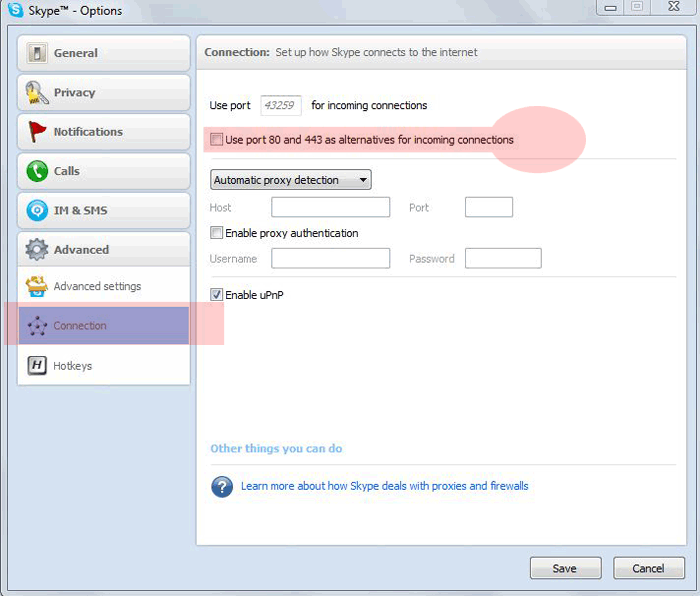 As shown in the above picture, all you have to do is un-check the box which says use port 80 and 443 for incoming connections.
Once you do this, you can test your Apache web server and see that it is back up and running 🙂
About the Applications
Skype is a desktop instant messaging and voice software, similar to MSN Messenger and Yahoo! Messenger but is well know for its voice and calling capabilities, including free PC to PC calling.
Apache is a HTTP Web Server, majority of the web is using Apache to host our websites.

very interesting read, would love to read more on this.
I am using windows 7 and skype, your blog sure did give me some insights as to how to resolve the problem if ever I will encounter the same problem.