



Rapidshare has grown to become the leading file sharing service online, users who are limited to non-premium user accounts are often presented with timers or some other limitations.
Recently users have discovered ways of bypassing the download limits and skipping the waiting time.
I have been starting to use rapidshare much more often these days – i tried out this method and it worked out perfectly fine. I tried this on IE 7, IE 8 and Firefox 3.0.7 without any issues.
Lets begin, continue reading below..
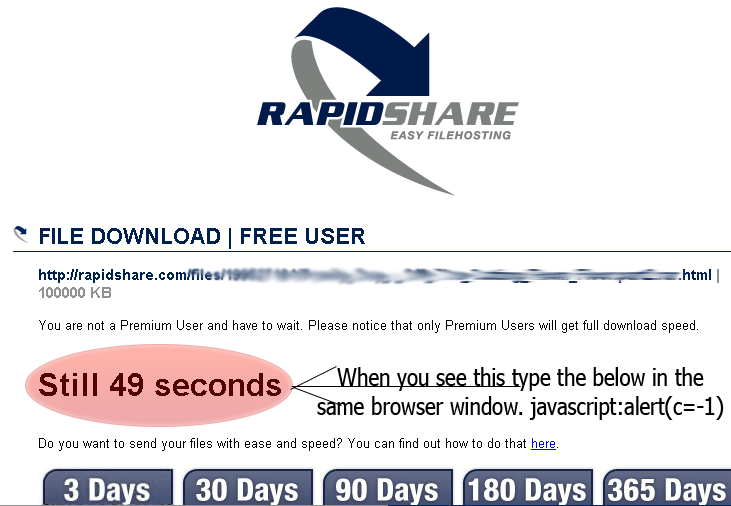
- First open the web browser and enter your rapidshare download link.
- When the page loads, you are given two buttons Free & Premium.
- Click on Free – The next page loads and you see the timer starting like in the above image.
- When you see that timer start just input this into your browser: javascript:alert(c=-1) and press ENTER.
The timer should disappear and now you can download easily without any waiting 😉
Please do post your comments and let me know what happens 🙂

Awesome, No one can stop me from copying this post to my blog 😛
one thing, I do not know what making your blog loading slow, i think too many scripts.
@Aaqil Mahmood:
Great, you can copy the post as you like fit, but i’d appreciate if you could link back to this post 😉
Glad you liked it!
I’m not sure why you’re experiencing long loading time with this site – but i think it might be your isp (maybe) whose services are you using ATM?
Because for me this page loads in about 5 seconds maybe less no more than and i’m using Wateen’s Services.
I have recently added some new scripts and widgets but the speed remains same to me, i have also removed useless and time consuming plugins and script aswell.
of course with link back thank you… i am using ptcl dsl.
thanks – but thats odd, well i’m trying to remove some scripts to lessen the load on the site, so lets see if that helps 🙂
when i click enter it redirects me to a page that says my computer doesnt support java script… anyway to fix this?
@WannaHackThis & Everyone Else:-
When it says that the javascript is disabled in your browser, you should copy/paste the URL of the file that you see in the Address Bar to a new tab window and your download will start.
Hope that helps 😉
WOW! really! i’d try it sometime. i normally dont use rapidshare.
Nice bro.. tq.. 😉
Keep it up good work. Thanks
Great tutorials thank you so much for sharing this wonderful information. Now I can download rapishare file with no limits
this is really helpful thanks mate…
wow great bro thxs
What to do with this
The download cannot be provided. Please check, if your browser supports Javascript.