


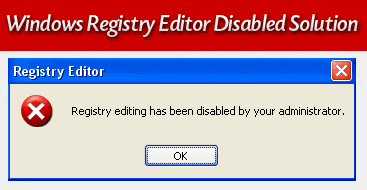
Windows Registry Editor Disabled
Microsoft Windows XP has a Windows Registry Editor (regedit.exe) – Which i am sure most of you are aware about?
This registry editor is quite useful in many cases, specially if you ever want to enable or disable certain features on your windows or delete unnecessary entries manually. (Which i sometimes prefer).
If for some reason it has been disabled on your computer which is often and mostly caused by a computer virus – Below are some methods that you can use to get back your precious Windows Registry Editor!
The method we will be using is with gpedit.msc (Group Policy Editor):
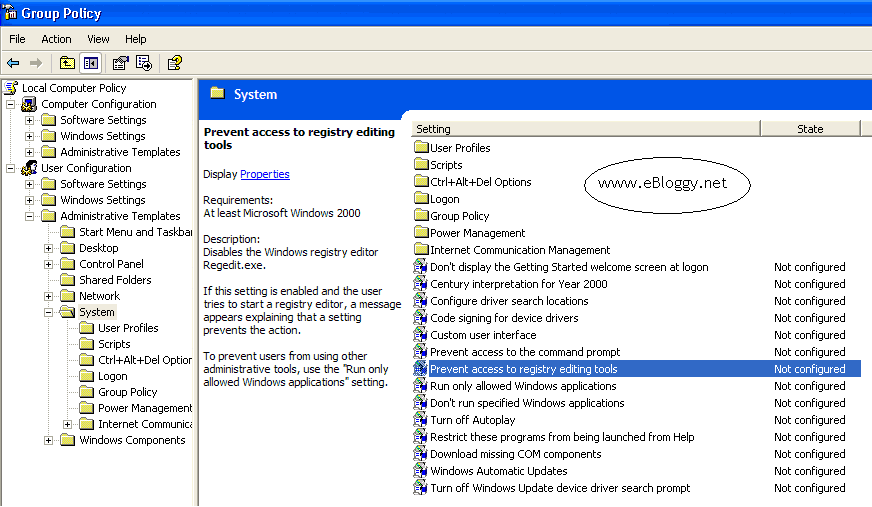
- Goto the Start Menu Then Run and Type gpedit.msc
- On the left side Goto User Config -> Administrative Templates -> System
- Now on the right side, Select “Prevent access to registry editing tools”.
- Regardless of the whatever its current value is Change its value to be Disabled.
Close the gpedit.msc window and try opening your Registry Editor now. Check to see if it works? If not its probably because the setting might not have taken effect yet. We can tell the computer to do so by doing the following:
- Go to Run again.
- Type Command in it, The Command Prompt should now be visible and in-front of you.
- Type gpupdate in the Command Prompt.
This will tell the Group Policy Editor – gpedit.msc to refresh its settings. Now try opening the Registry Editor once again. With any luck it should be working for you now 😉
If for some reason the above procedure does not work for you – There are 2 additional methods you can do to fix this problem. But i will point that out when some one needs more help.
Thanks for reading and please do post your comments if this post has or hasn’t helped you solve your problem.

Hello Sir,
Please tell me other two methods to enable Registry Editing because the first method Gpedit.msc is not working because gpupdate is not possible since cmd window is closing before typing Gpupdate.
Hi Barun,
Barun, if gpupdate is not working for you – you can just try to restart your system manually after making the changes. Have you tried that?
Download this App that i am posting below and Run it. – it should fix your registry disabled problem.
Click Here to download the application to fix Windows Registry Disabled Issue.
Let me know how it goes 🙂
Great post. Thanks for sharing!
I also have an registry cleaner software to recommend.
sir,my task manager n regedit are disabled by the administrator. i’ve already done what u say at the above,but when i go to the gpedit,in my admistrative there in nothign to shown…n my antivirus software also is trun off…i hope u can reply to my problems by email me..tq..
@ Che:
Sorry to hear this didn’t work for you, but it sounds like you might be a victim of a virus attack on your pc.
Have you tried re-installing your anti-virus?
Brilliant, thanks a million! worked like a charm!
I can’t find the line “Prevent access to registry editing tools”. how do I get it?
Thank You,
Actually I was facing problem with ‘Windows genuine shit’.
I learned to delete wgatray.exe but got stuck enabling regedit.
thanks 4 helping me know the exact location of registry enabling in gpedit.msc
thANK YOU SOOOOO MUCH GUYS…THAT WAS THE PERFECT SOLUTION OF MY PROBLEM….THNKZZZZZZZZ
This is a quick fix if the cmd is working. But it would be hell if the cmd isn’t working.