



GetClicky Web Analytics makes web analytic easy, fun, powerful, and drop dead gorgeous.
I have been using GetClicky for over a week now and i have to say it is pretty amazing. The statistics that are available to you are pretty simple to understand not to mention highly detailed. GetClicky is giving every single detail of your visitors – GetClicky also has dozens of cool features including Google Map integrated into the tracking system.
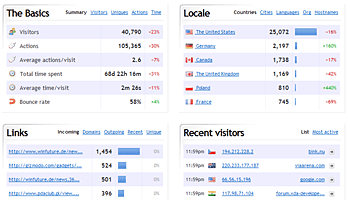
Webmasters can easily see their visitors on the map on a single destination. The above picture shows your Dashboard – All users get a dashboard upon registration from which they can track their site statistics.
GetClicky Web Analytics can let you see details about your visitors very easily, The user-interface that it provides is pure Awesome! I have used Google Analytics. I was also a big-fan of it, until i came across GetClicky.
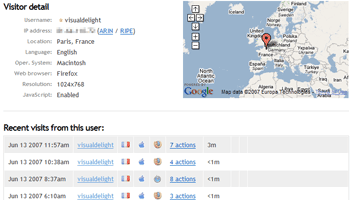
GetClicky can tell you every thing you want to know about your visitors, where they came from, where they went, what they did and what they were searching for.
One of GetClicky’s greatest feature is the Spying feature; You can easily see who is on your website Live! It even shows what they came looking for (if via a Search Engine).
GetClicky is very user-friendly, i have seen many new webmaster get confused with Google Analytics very easily. But GetClicky is truly amazing. It gives you every ounce of detail you can imagine, while on the other hand it keeps it so simple that even newbies don’t have trouble understanding.
If you want you can also allow your site visitors to see your traffic statistics or you can hide them as well, The choice is yours!
I have used both GetClicky Web Analytics and Google Analytics, and i really think that GetClicky Web Analytics is the way to go 😉 i really recommend everyone to at-least try out this new web analytics service.
If you decide to use Clicky Web Analytics you are given a piece of JavaScript code, just like you do with Google Analytic. Just put that up on your site and GetClicky will start tracking your traffic instantly, unlike Google Analytic where you have a wait a whole day before they even start to track!
GetClicky Web Analytics is really good and trust me i’m not saying it because they are paying me or something, its a free service; But additionally it does have extra features which comes at a cost.
Compare GetClicky against other competing services, including Google Analytics.

thank you
I think the above poster is right, what actually sets clicky apart is the fee. I can’t bring myself to pay for a service that, although perhaps not as together and coherent, is available elsewhere for free.